Best Betting Sites
»
Duelbits Review
»
Duelbits App Review for 2026
Duelbits App Review for 2026: An Updated Look at Safety and Core Functionality
Duelbits is restricted in your area.
By
James Thompson,
Last Updated on 24.09.2026
Most online gambling activities now happen on mobile, so if you’re looking for details on the Duelbits app, we’ve got all the information you need. In fact, Duelbits works smoothly on iOS and Android devices regardless of screen size.
We’d be upfront in this Duelbits app review and let you know that there’s no dedicated application. Still, that shouldn’t deter you from using the platform because if you still want one-click access, you’ll learn how to create a shortcut that works exactly like an app in 3 steps. There are also details on web play, safety, and lots more.
Table of Contents
Pros and cons: Duelbits app

Pros and Cons
- The mobile web version adjusts to all screen sizes
- Easy widget option to substitute for the missing app
- No missing features in mobile web version
- No downloadable software
Duelbits app availability and latest features
We tried to find a Duelbits Android app, but there was none available. Even for iOS, you have to stick with the mobile web version. This would feel a little disappointing if you prefer to just tap a single icon and have full access, so we found a way around that. You can avoid opening your browser each time you want to play if you set up a shortcut like this:
-
Visit the Duelbits site
Click our page banners to visit the operator’s site and register. While you won’t get a Duelbits no deposit bonus, you can get a different generous offer specific to your location. If you want to see what is currently being offered to your location, you can check the Duelbits banners displayed on this page.
-
Add to home screen
Check the default search bar at the top of your screen, where you can see the site’s URL. To the right side, there’ll be a square with an arrow popping out of it. That’s a share icon, and you’ll need to click on it. Scroll through the options that appear once you click and tap on “add to home screen.”
-
Start using your app substitute
Now, you should have the Duelbits site on your homescreen just like an app. You can click on it anytime you want to play without the hassle of typing a fresh URL into your browser.
Plus, here are a few reasons why the shortcut is an even better option than using downloadable Duelbits iPhone or Android software.
| App | Web shortcut |
|---|---|
| Requires a download, which consumes more data | Webplay saves your data |
| Consumes mobile memory space | Lightweight; no storage is needed. |
| Regular updates | No updates required. |
Duelbits web — Usability facts and player experience
Before you try to sign up and play on mobile, find out if the site operates in your region. If you’re unsure, our detailed review answers the question of “Where is Duelbits legal?” In places where you can access the site, these are the most important usability details we recorded:
| Factor | Experience |
|---|---|
| Load speed | 0.3 seconds |
| All desktop web features available | Yes |
| Navigation | Easy |
| Buttons and icon access | The buttons and icons are within easy reach in both landscape and portrait modes. |
There are no special rules on how you should use the mobile web version of the site. Although based on our general experience with mobile play, we identified some issues that you may encounter. These are not the operator’s fault and often boil down to the device you use, your internet speed, and even your browser. Here are the common bugs and what you can do to fix them right away.
Experiencing slow loading and invisible features?
Check to confirm that you have the most recent version of your mobile browser and that you’re connected to stable internet. Preferably, use an updated Chrome browser and mobile data or a fast wifi connection.
Noticing icons not clicking?
If your device has a small screen, the icons will definitely appear smaller than usual, and that can make payments or even gaming on the site tedious. To improve your experience, hold your smartphone in landscape mode and zoom in so that only the most important elements appear bold. That way, you can easily use the features you desire.

Play fun slot games at Duelbits
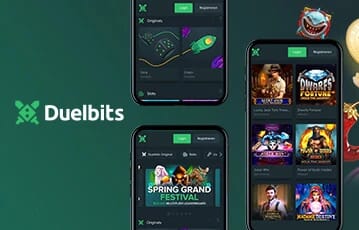
Access Duelbits using your mobile browser
Playing games and making payments on Duelbits mobile
If you’ve played on the desktop version of Duelbits, you can expect a similar experience on the mobile website. We tested the most important features like payments, gaming and using promotions, and these are some tips that you’ll find useful:
- Play in landscape: Games run smoothly since all the titles in its library are HTML5-based. However, to play slots and instant win games more comfortably, you should hold your smartphone in landscape mode. It’ll make clicking buttons easier and faster.
- Purchase crypto on the platform: To get Duelbits cryptocurrencies for play, use the purchase option on the platform. This is simpler compared to buying from external exchanges if you are new to using crypto. Also, it saves you the back and forth of switching between an exchange app and your browser.
Once you start playing on the site, be extra careful with claiming bonuses by first going through the details. You may not find deals like Duelbits gift card, but you’ll sure get lots of seasonal offers that you can claim on mobile.
Final thoughts: no Duelbits app, but smooth shortcut and web access
The main reason most players seek an app is convenience, but Duelbits provides the same ease of use through its mobile website. You’ll only need an updated version of your chosen browser and a reliable internet connection. Besides, every smartphone already comes with a browser, so you won’t need to take up more memory just to install a casino gaming app.
If you insist on not opening a browser every time, then take a few seconds to set up the one-click widget on your homescreen. This feels just like having an app, but without the constant updates or lags. Overall, Duelbits gives you a portable mobile gaming experience regardless of your device's operating system. Try it for yourself by clicking the banners on this page and you may even get yourself a sign-up deal to start with!