Best Betting Sites
»
SpinQuest Review
»
SpinQuest App Review 2026
SpinQuest App Review 2026: Is SpinQuest Legit? Comprehensive Ratings
By
James Thompson,
Last Updated on 22.10.2026
SpinQuest packs everything from slots to live dealer tables to quick play specialty titles in one platform. Before you go searching your app store though, there is no SpinQuest app, so there is nothing to download at all.
That might sound like a letdown at first, but stick with us. Below, we are going to show you exactly how to add SpinQuest to your phone so it sits right on your home screen and opens just like a native app, no app download required. Let's walk through getting SpinQuest set up on both Android and iPhone.
Table of Contents
SpinQuest Casino pros and cons

Pros and Cons
- No mobile download required
- Daily 10,000 GC and 1 SC reward
- Works on Android and iPhone
- No official native app
Is there a SpinQuest Casino app on iPhone and Android?
| Feature | Android | iOS | Detail |
|---|---|---|---|
| Dedicated mobile app | No | No | SpinQuest has no Google Play or App Store download |
| Access method | Chrome browser | Safari browser | The full sweepstakes casino runs through the mobile website |
| Home-screen installation | Three-dot menu, then add to Home Screen | Share icon, then add to Home Screen | Creates a SpinQuest icon that opens like an app |
| Registration details | Username, name, email, country and state | Username, name, email, country and state | Registration usually takes only a few minutes |
| Daily login bonus | 10,000 Gold coins and 1 SC every day! | 10,000 Gold coins and 1 SC every day! | Claimed daily through the Promotions tab |
| Sweeps Coin redemption | Minimum 50 SC | Minimum 50 SC | Sweeps Coins require a 1× playthrough |
| Game access | 847 | 847 | Includes Le Bandit, Le Pharaoh and Monopoly Big Baller |
| Browser support | Chrome and compatible browsers | Safari recommended | Safari is required for iPhone home-screen installation |
SpinQuest runs as a sweepstakes casino, meaning the whole platform works through virtual currencies and there is no SpinQuest Casino real money gameplay. Gold Coins can be used across the library, while Sweeps Coins are the virtual currency that can turn into a real prize once they clear the required 1x playthrough and reach the minimum 50 SC virtual balance.
We asked SpinQuest directly whether an app exists, and the answer was clear. There is no dedicated SpinQuest app right now, on either iPhone or Android. Instead, SpinQuest confirmed that the site itself is fully optimized for mobile use, meaning every game and every feature runs smoothly straight through your phone or tablet's browser, whether that is Safari, Chrome, or anything else you prefer.
In the next section, we are going to show you exactly how to add SpinQuest to your phone on both Android and iOS, so it opens like a native app every time you tap the icon.

200% Extra: 300,000 Gold Coins + 30 SC
T&Cs and 18+ apply
110,000 Gold Coins and 3 SC FREE
T&Cs and 18+ apply
10,000 Gold coins and 1 SC every day!
T&Cs and 18+ apply
How to use SpinQuest on Android devices
Getting SpinQuest set up on an Android phone takes just a few minutes, and once it is done, you can jump straight into your account without typing a web address every time. Here is exactly how we did it, one step at a time.
-
Click our on-page banners
Start by tapping one of our on-page banners right here to land on the official SpinQuest site. Going through our verified banner guarantees you reach the real platform every time. Once the page loads, you will see the SpinQuest logo sitting at the top, along with Login and Sign Up buttons ready to go.
-
Register and fill your details
Tap Sign Up and work through the registration form. You need to know what states is SpinQuest legal in because the registration form will ask for your username, first name, last name, email address, country, and state. This whole thing took us just a couple of minutes to complete from start to finish. Once your details are submitted and your account is confirmed, you are ready to move on to claiming your very first bonus.
-
Go to the promotions tab and claim your daily login bonus
Head over to the Promotions tab sitting inside your account dashboard. This is where SpinQuest keeps its daily bonus reward, handing out 10,000 Gold Coins plus 1 Sweeps Coin every single day simply for logging in and tapping the claim button. You don't need SpinQuest promo codes for existing players to claim this. We made sure to grab this immediately after registering, since there is no reason to leave it sitting there unclaimed.
-
Add SpinQuest to your home screen
Now for the step that actually turns SpinQuest into something that feels like an app. Open your Chrome browser menu while sitting on the SpinQuest site, found by tapping the three dots in the top corner of the screen. Look for an option labeled Add to Home Screen and tap it.
A small prompt will pop up asking you to confirm, and once you do, a SpinQuest icon drops right onto your home screen. From that point forward, tapping the icon opens SpinQuest instantly, without a browser bar or address field anywhere in sight.
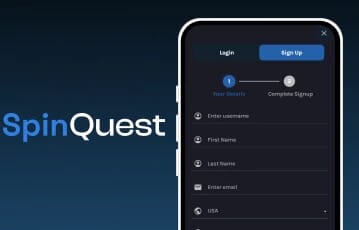
Sign up to SpinQuest on mobile

Stay connected to SpinQuest while on the go
How to open SpinQuest on iOS
iPhone users get the same end result, an icon that opens SpinQuest instantly, but the steps to get there look a little different since Apple handles things through Safari instead of Chrome. Here is exactly how it works.
-
Open SpinQuest through Safari
Start by opening Safari on your iPhone and tapping one of our on-page banners. Safari is required for this particular installation method, since Chrome on iOS does not support the same home screen feature.
Once the page loads, log in if you already registered on Android or desktop, or work through the same quick Sign Up process covering your username, name, email, country, and state.
-
Tap the share icon and add to home screen
While sitting on the SpinQuest site inside Safari, tap the Share icon sitting at the bottom of your screen. It looks like a small square with an arrow pointing upward. A menu will slide up from the bottom, and you will need to scroll through the options until you spot Add to Home Screen.
Tap it, confirm the name if you want to change it, and tap Add in the top corner. A SpinQuest icon will appear on your home screen within seconds, ready to open just like any other app on your phone.
-
Claim your bonus and start playing
Once the icon is sitting on your home screen, tap it to open SpinQuest and head straight for the Promotions tab to claim your daily 10,000 Gold Coins plus 1 Sweeps Coin. From there, browse through SpinQuest games like Le Bandit, Le Pharaoh, 2 Wild To Die, and Monopoly Big Baller as smoothly as you would on Android.
Sign up and add SpinQuest to your home screen
Once you add SpinQuest to your home screen, it’s easy to see why you won’t miss having a dedicated app. The site has a clean, app-like feel on both Android and iOS, making it quick and convenient to access your games whenever you want. Your games are only a tap away, without having to open your browser and search for the site each time.
Registration only takes a couple of minutes, and once you’re signed up, you can claim the welcome bonus of 110,000 GC + 3 SC and check the Promotions tab for your daily login bonus of 10,000 Gold Coins and 1 Sweeps Coin. It’s a simple setup that gives you quick access to SpinQuest and its games without needing to download a separate app. Ready to get started? Use our on-page banners to sign up and add SpinQuest to your home screen.

FAQs on SpinQuest Casino
Final Rating